
6D
Description
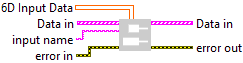
Adds to the ptr input array a 6D array (of type BOOL, SGL, INT, UINT, or STRING) at a specified name. Type : polymorphic.
Input parameters
 6D Input Data : array, 6D array of data with any type : integers (signed/unsigned), floats, doubles, booleans, or strings.
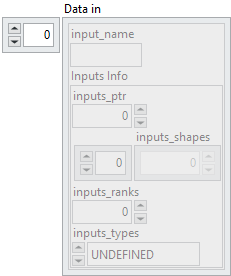
 Data in : array,
 input_name : string, specifies the identifier of the input. It corresponds to the name given to the input during its creation (via the optional name parameter).
 Inputs Info : cluster
 inputs_ptr : integer, represents a pre-allocated device memory address (for example, a CUDA device pointer) where the input tensor data is already stored.
 inputs_shapes : array, specifies the shape of the output tensor. Since the data is written into a pre-allocated device buffer, this shape allows the runtime to interpret the memory layout correctly.
 inputs_ranks : integer, indicates the rank of the tensor, i.e. the number of dimensions (Scalar = 0, 1D = 1, 2D = 2, etc.).
 inputs_types : enum, defines the ONNX tensor type as an enumerated value (e.g. FLOAT, INT64, STRING).
input name : string, specifies the identifier of the input. It corresponds to the name given to the input during its creation (via the optional name parameter).
Output parameters
 Data in : array,
 input_name : string, specifies the identifier of the input. It corresponds to the name given to the input during its creation (via the optional name parameter).
 Inputs Info : cluster
 inputs_ptr : integer, represents a pre-allocated device memory address (for example, a CUDA device pointer) where the input tensor data is already stored.
 inputs_shapes : array, specifies the shape of the output tensor. Since the data is written into a pre-allocated device buffer, this shape allows the runtime to interpret the memory layout correctly.
 inputs_ranks : integer, indicates the rank of the tensor, i.e. the number of dimensions (Scalar = 0, 1D = 1, 2D = 2, etc.).
 inputs_types : enum, defines the ONNX tensor type as an enumerated value (e.g. FLOAT, INT64, STRING).
Example
All these exemples are snippets PNG, you can drop these Snippet onto the block diagram and get the depicted code added to your VI (Do not forget to install Accelerator library to run it).