
Clip
Description
Clip operator limits the given input within an interval. The interval is specified by the inputs ‘min’ and ‘max’. They default to numeric_limits::lowest() and numeric_limits::max(), respectively. When ‘min’ is greater than ‘max’, the clip operator sets all the ‘input’ values to the value of ‘max’. Thus, this is equivalent to ‘Min(max, Max(input, min))’.
Documentation illustration (illustration unavailable in the archive).
Input parameters
 specified_outputs_name : array, this parameter lets you manually assign custom names to the output tensors of a node.
 Graphs in : cluster, ONNX model architecture.
 input (heterogeneous) – T : object, input tensor whose elements to be clipped. min (optional, heterogeneous) – T : object, minimum value, under which element is replaced by min. It must be a scalar(tensor of empty shape). max (optional, heterogeneous) – T : object, maximum value, above which element is replaced by max. It must be a scalar(tensor of empty shape).
Documentation illustration (illustration unavailable in the archive).
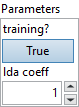
Parameters : cluster,
 training? : boolean, whether the layer is in training mode (can store data for backward).
Default value “True”. lda coeff : float, defines the coefficient by which the loss derivative will be multiplied before being sent to the previous layer (since during the backward run we go backwards).
Default value “1”.
 name (optional) : string, name of the node.
Output parameters
 output (heterogeneous) – T : object, output tensor with clipped input elements.
Type Constraints
T in (tensor(bfloat16), tensor(double), tensor(float), tensor(float16), tensor(int16), tensor(int32), tensor(int64), tensor(int8), tensor(uint16), tensor(uint32), tensor(uint64), tensor(uint8)) : Constrain input and output types to all numeric tensors.
Example
All these exemples are snippets PNG, you can drop these Snippet onto the block diagram and get the depicted code added to your VI (Do not forget to install Deep Learning library to run it).