

Sorry for the late reply.
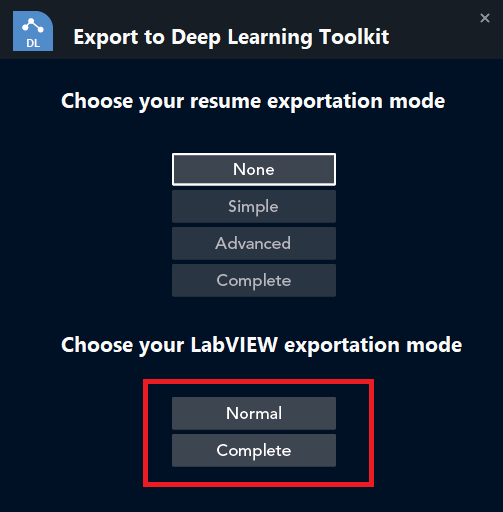
Your screenshot actually shows a “Normal” export. This mode generates the LabVIEW class associated with the ONNX file, along with a small summary (.txt file) listing the model’s inputs and outputs to help you run it later. You can then modify the class through Get/Set methods, but if you want more precise and modular control, the “Complete” export option is the better choice.
That said, based on your description, even with the “Complete” export, the model isn’t being scripted. I tried to reproduce this in LabVIEW 2025 Q3, and scripting worked fine on my end. Here’s what I did:
Opened LabVIEW
Launched FIG
Clicked Load File and selected sobel_filter.onnx
Clicked Export, then chose Complete at the bottom of the window
→ At this point, a new VI opened and scripting automatically started, recreating the full graph.
Can you double-check that you selected the correct export type? The first four buttons in the Export window only define the type of summary that gets generated. It’s the two buttons at the bottom that determine whether the graph is fully scripted or if only the class (containing the graph) is created.
To help narrow down the issue, could you share a bit more about your setup? For example:
Which version of Windows are you running?
Do you see any error messages or warnings during the export?
-
This reply was modified 10 months ago by
 Youssef MENJOUR.